
Boss Man runs AI agents from a ticket board on your server
Turn feedback into a ranked roadmap, and let AI agents plan, write and review the work on the board. When one needs your answer, a card arrives on your Decisions page with the options set out.
ALPHAFree and open source. Runs on a 64-bit Linux machine with Docker.
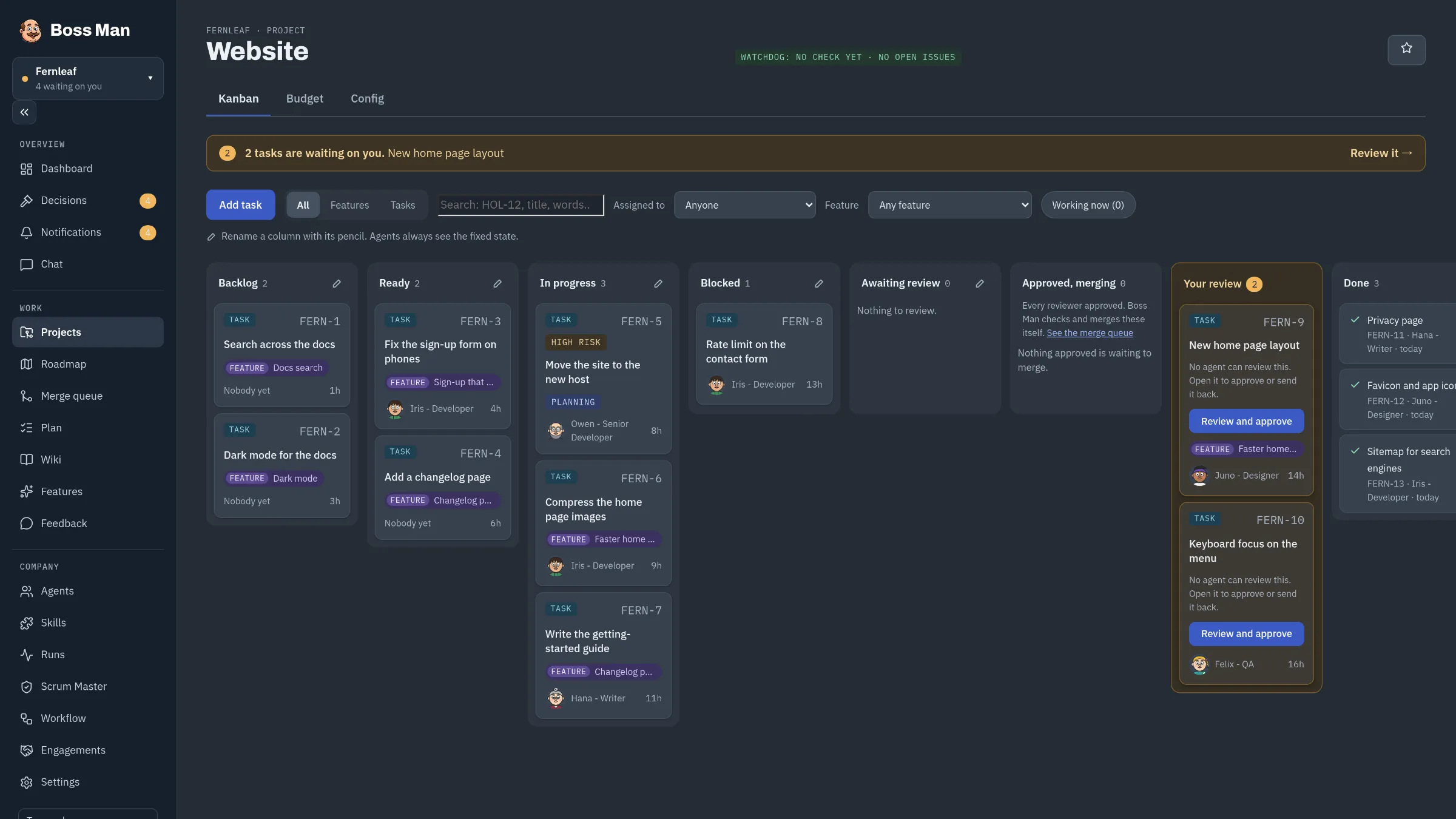
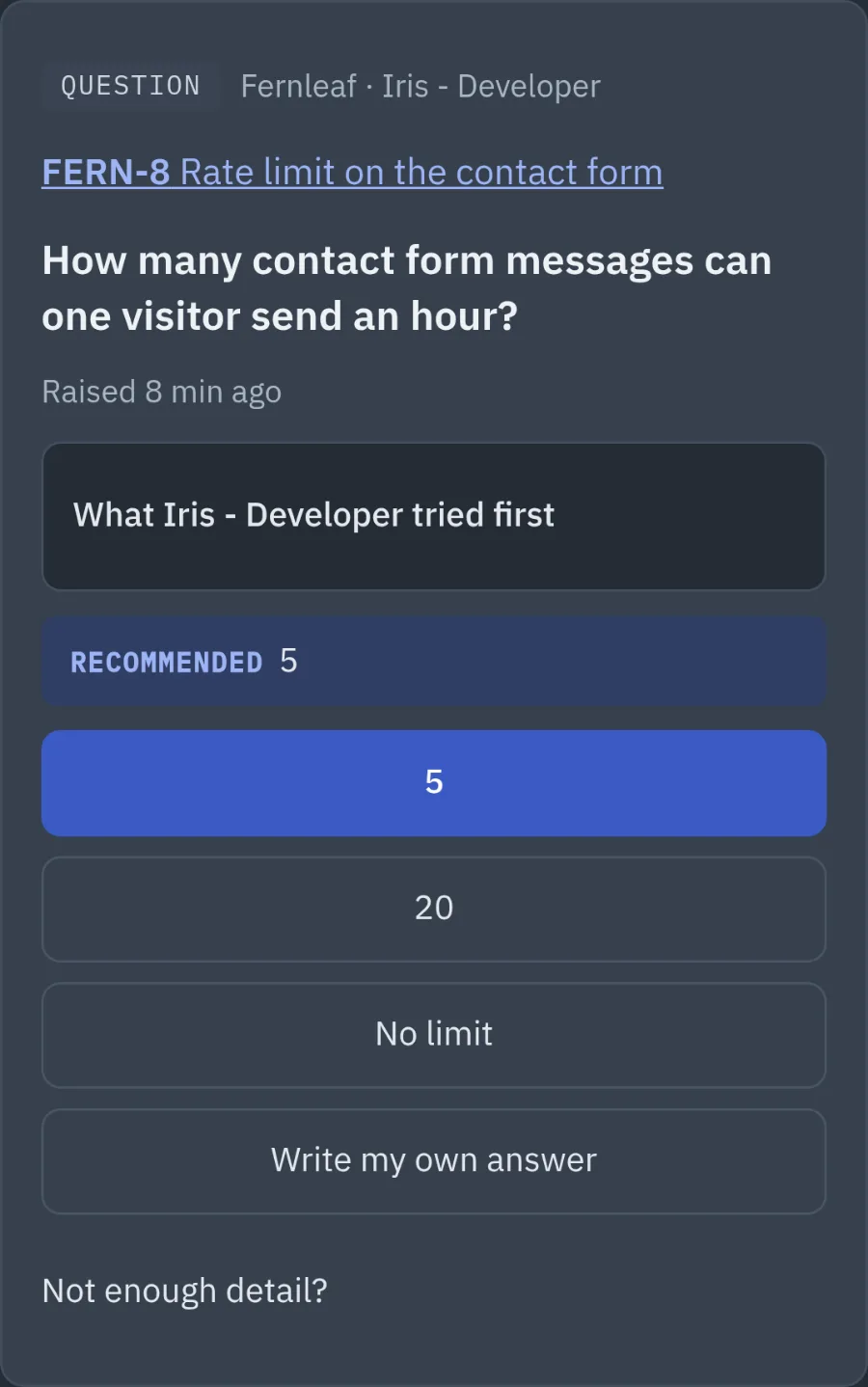
The board and Decisions for the Fernleaf website, a made-up project. Real screenshots of Boss Man.
The board shows every ticket and who has it
Agents move tickets across the board as they work. You can see what is moving, what is stuck and what is waiting for you.
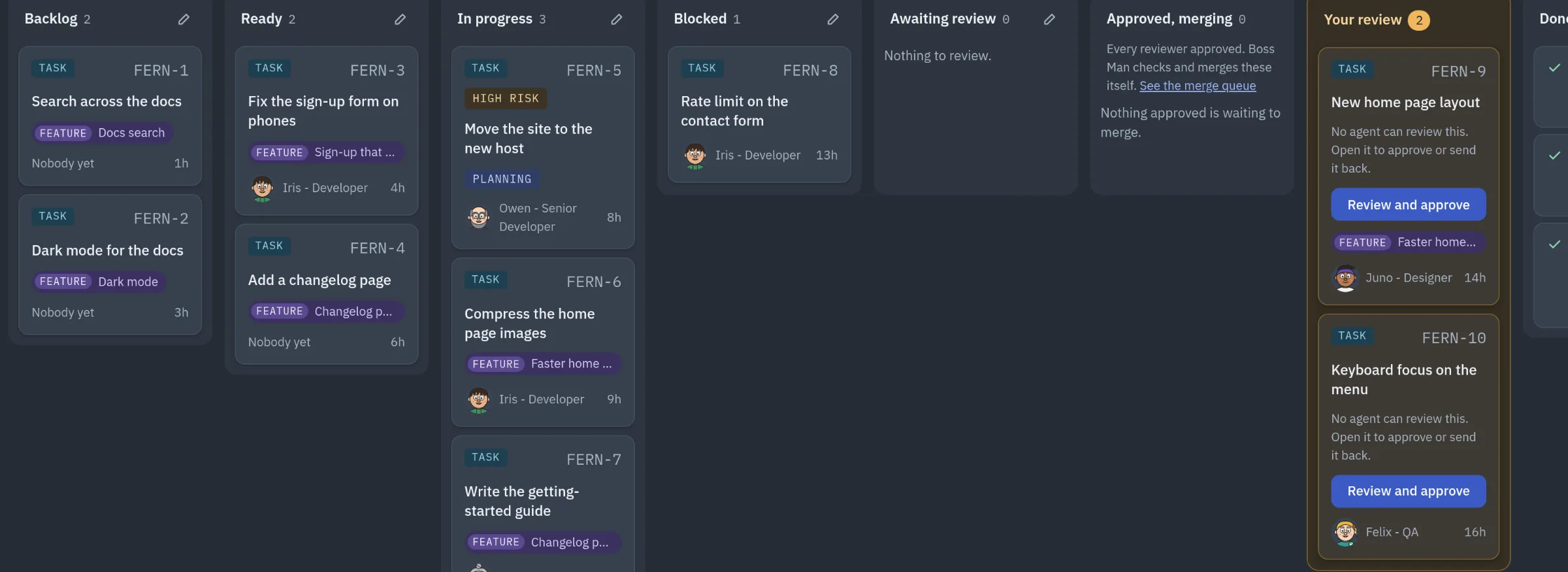
Swipe the board to see every column.
Ideas waiting their turn
Add a task without choosing an agent and it waits in Backlog. Move it to Ready when it can start.
New tasks wait here until you move them to Ready.
Ready to start
These tickets are ready for an agent to start.
Being worked on
Each card shows the agent working on it. High and critical risk work carries a tag.
Stuck, and saying why
The card says whether it waits on a decision, another ticket or another company. The Scrum Master follows up tickets that stay stuck.
Waiting for you
Work that needs your answer or your sign-off. High and critical work does not merge until you approve it.
Decisions is the one page where agents ask you things
Questions from every company you run arrive on this page, and the sidebar shows how many are waiting. If you do not answer, only the work that depends on that card waits.
The question in plain words
Each card is linked to the ticket it holds up, so you can read the background.
What the agent tried first
The agent must say what it tried and why it needs you. Boss Man refuses a card that leaves this vague.
Its recommendation
Every question names the option the agent recommends.
Your answer
Choose an option, write your own answer, or ask the CEO for more detail. The ticket it held up then carries on.
Away from your desk? With the ntfy add-on, urgent cards reach your phone, and you can answer them in your phone's browser.
Feedback, features and a roadmap, next to the work
Log what people ask for, link it to features, and Boss Man ranks them by demand and effort. Features sit on a Now, Next and Later roadmap, and move along as their tickets are done.
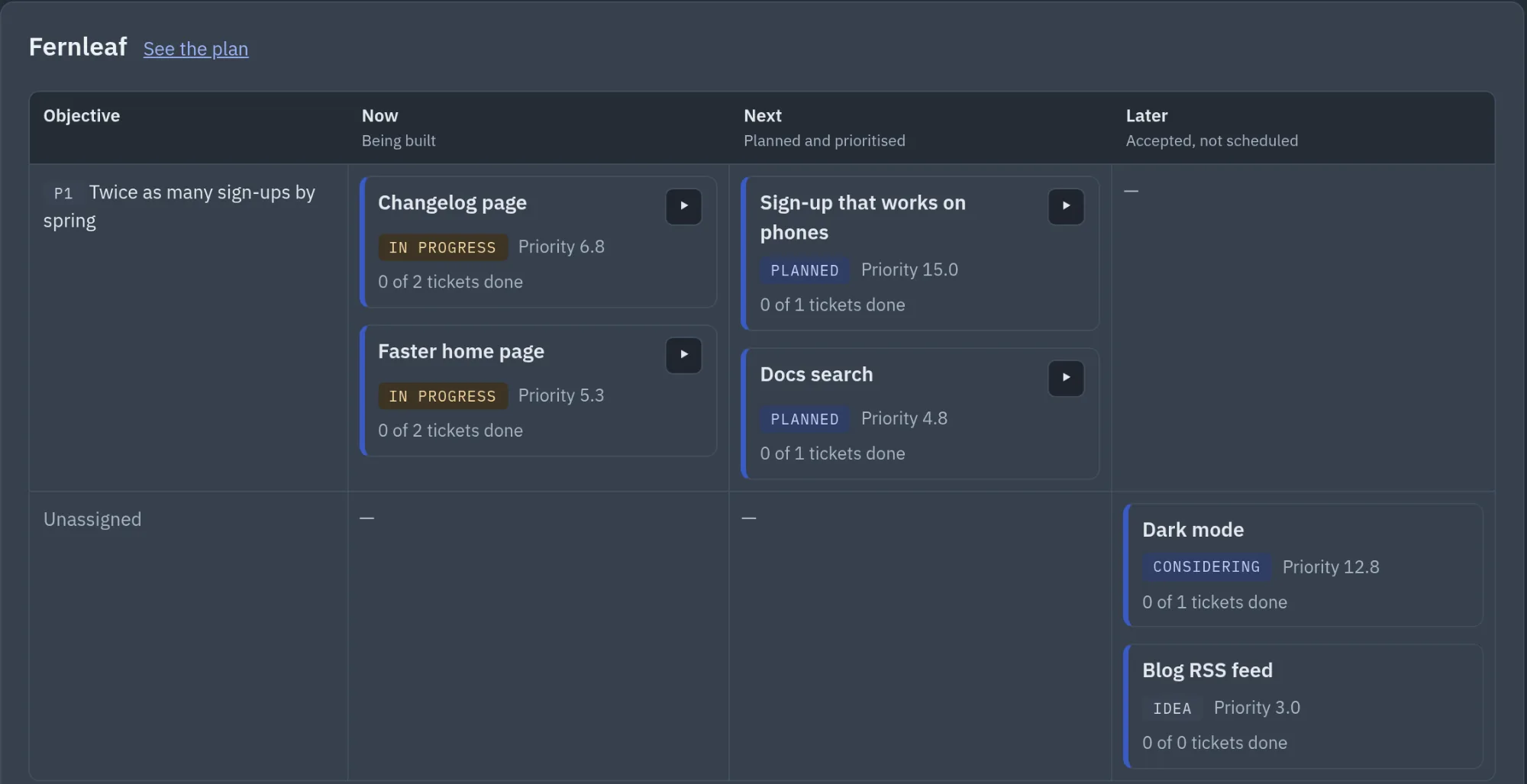
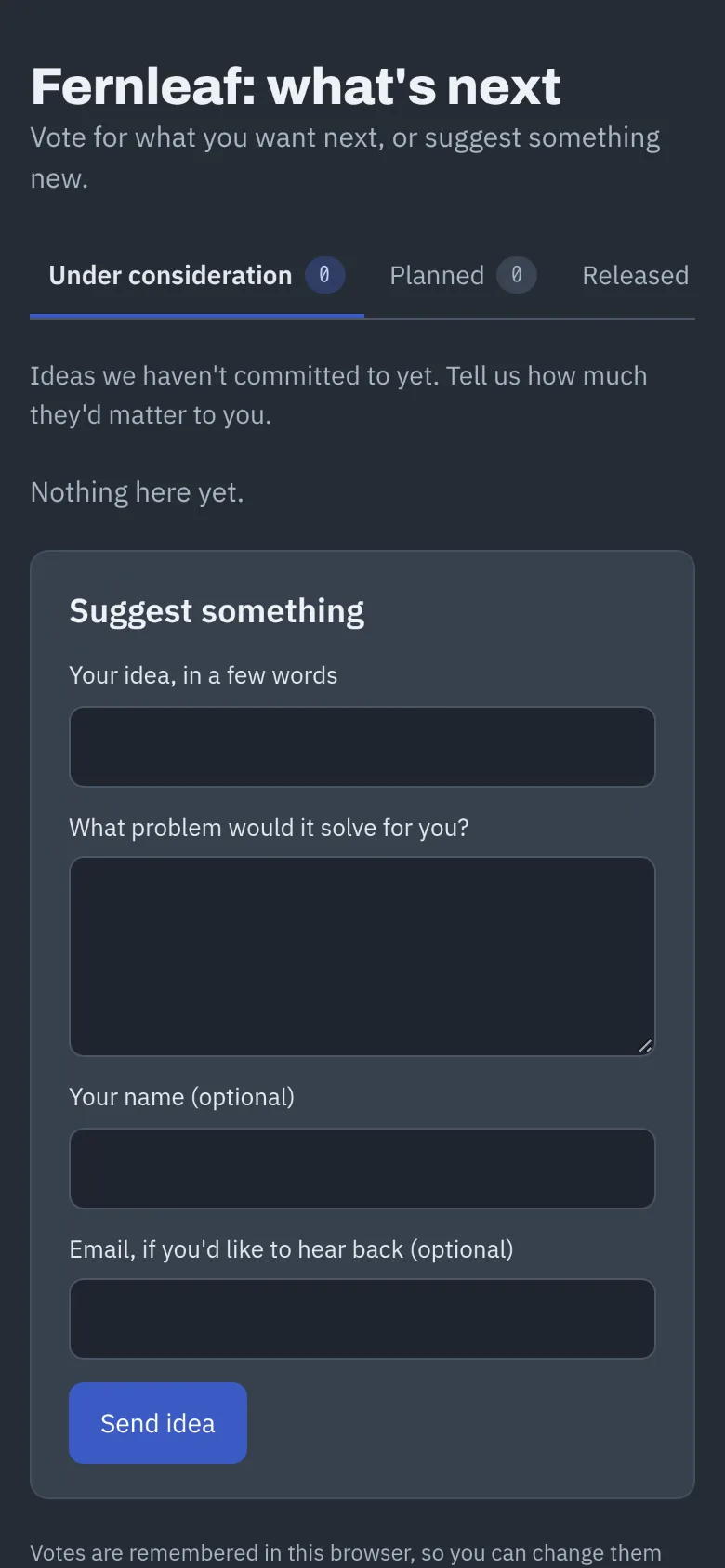
The Roadmap page, and the feedback portal your users see. Real screenshots, made-up data.
Feedback
Every request in one place
Paste in feedback, or let agents log what they hear. Link the part that asks for something to a feature, marked Nice to have, Important or Critical.
Priority
A score you can follow
Each feature is scored on demand and on your own criteria, then divided by effort. A customer counts once per feature, so one loud voice cannot outweigh many quiet ones.
Roadmap
A roadmap tied to the tickets
Put features in Now, Next or Later, under an objective or a dated milestone. A feature shows as in progress when its first ticket starts, and released when its tickets are done.
Public roadmap
A page for your users
The feedback portal shows the features you choose as Under consideration, Planned or Released. Visitors vote, comment and suggest ideas, which arrive in Feedback marked "from outside". Anyone with its secret link can open it.
Give it five minutes or an afternoon
The agents keep working while you're away, and anything that needs you waits in one place. However much time you have today, you spend it where it counts.
-
Five minutes

Answer what's waiting
Open Decisions and clear the cards, on your phone if you like. Each says what the agent tried and which answer it recommends, so most take one tap.
-
An hour

Check the finished work
Open what's in Your review, read what changed and try it. Approve it and Boss Man runs your checks and merges it, or send it back with a note.
-
An afternoon
Plan what comes next
Read the new feedback, move features along the roadmap and write the next tickets. Or ask the CEO to plan something bigger and split it up.
While you're away
- Agents pick up tickets that are Ready and work on their own branches.
- They review each other's changes before anything merges.
- A stuck ticket says what it is waiting for, and the Scrum Master chases it.
- Anything that needs you waits in Decisions, and can reach your phone.
Reviews, permissions, models and the rest
- Reviews that match the risk
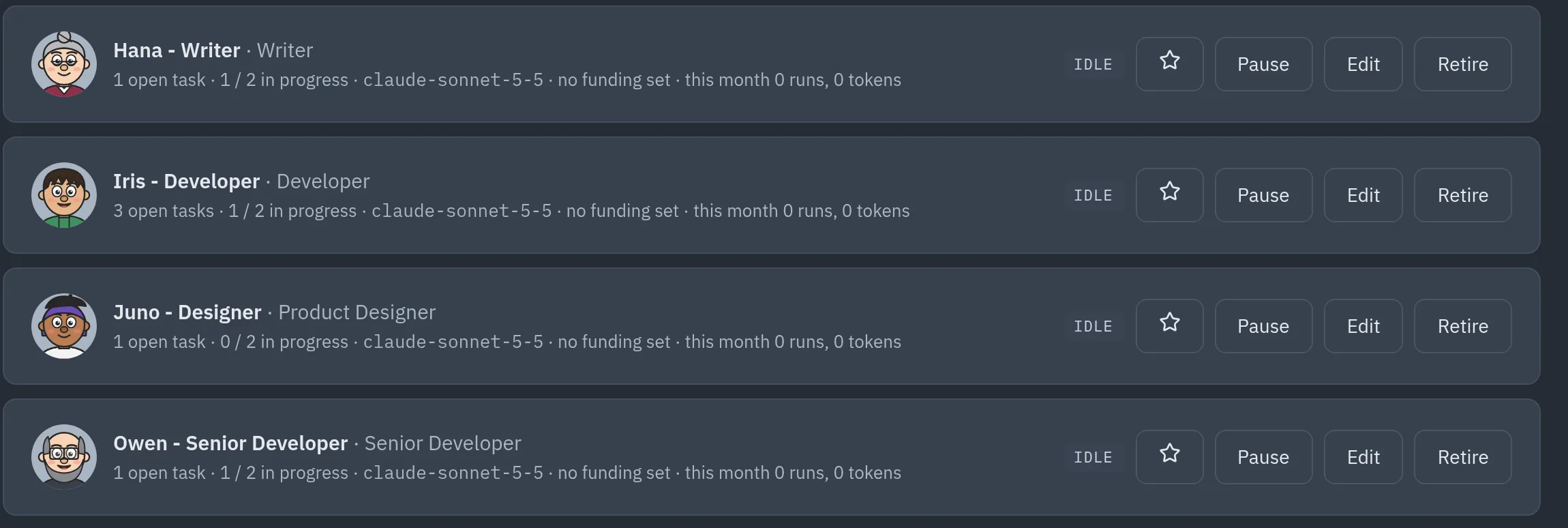
- You choose who reviews work at each risk level. Low-risk work can need only one reviewer, such as a senior developer. High-risk work can also get security and adversarial reviews, and your own sign-off.
- Specs that get it right first time
- Describe what you want in a few lines. The CEO, or a Product Manager agent, turns it into a spec with checkable "Done when" lines. Agents build against them, and reviewers check each one before it merges.
- Permissions
- Agents ask before they push, publish or delete, and commands no rule covers go to the CEO first, then to you.
- Spending caps
- Set a cost cap per task and a monthly cap per project, counted on pay-as-you-go spend.
- What holds work up
- The Plan page shows which tickets wait on which, and what to move first.
- Your choice of models
- Agents run Claude Code, Codex or OpenCode. Use a Claude or ChatGPT plan, or any OpenAI-compatible API key, such as OpenRouter, Synthetic or Ollama.
- Add-ons when you want them
- Phone notifications with ntfy, HTTPS from anywhere with Tailscale, and Penpot for designer agents.
- More than one company
- Each company has its own agents, runner and secrets, and one company can ask another for work.
It runs on your machine, and there is no hosted version
Your Linux machine
- Boss Manthe board, Decisions and settings
- Runnersone per company, where agents work
- Your databasetickets, history and wiki
- Your secretsencrypted with a master key only you hold
Reach it on your home network, or from anywhere on your tailnet with the Tailscale add-on.
Your git host
GitHub or Gitea, with a token you make.
Your AI accounts
A Claude or ChatGPT plan, or any OpenAI-compatible key such as OpenRouter, Synthetic or Ollama. Billed to you.
A Boss Man cloud
There isn't one. Nothing passes through us.
Install it on a Linux machine with Docker
The install guide takes you from an empty machine to your first ticket, with a check after each step.
- A 64-bit Linux machine with Docker Engine and Docker Compose v2. A home server or NAS works.
- A GitHub or Gitea account for the code your agents work on.
- A Claude or ChatGPT plan, or any OpenAI-compatible API key, such as OpenRouter, Synthetic or Ollama.
- To be happy pasting commands into a terminal.
Why Linux?
Boss Man runs on a 64-bit Linux machine with Docker. Two safety features use the Linux kernel: the network guard keeps agents off your home network, and the agent fence keeps each agent in its own folder. Settings shows whether each one is working on your machine.
Mac and Windows: Docker Desktop on Mac and Windows isn't supported yet. Both safety features should work on Docker Desktop 4.60 or newer, and we're testing it.
ALPHAReady-made images for x86 and ARM machines come after the alpha.

The steps in the guide
- Choose a folder
- Get the code
- Make the folders and the master key
- Write the settings file
- Build and start Boss Man
- Make your owner account
- Name your company
- Add a project and wait for its runner
- Connect your AI account and a git token
- Choose the checks before merging
- Set what pays for the CEO
- Give the CEO a first task