
Guides Everyday use
The board and Decisions
The board shows every ticket in a project. Decisions shows everything that needs your answer. This guide explains both.

The board's columns
Open Projects and choose a project. Tickets sit in six columns:
- Backlog: written but not started
- Ready: ready for an agent to pick up
- In progress: an agent is working on it
- Blocked: waiting, with nothing to work on yet (see What Blocked means)
- Review: waiting for review or merging
- Done: merged or closed
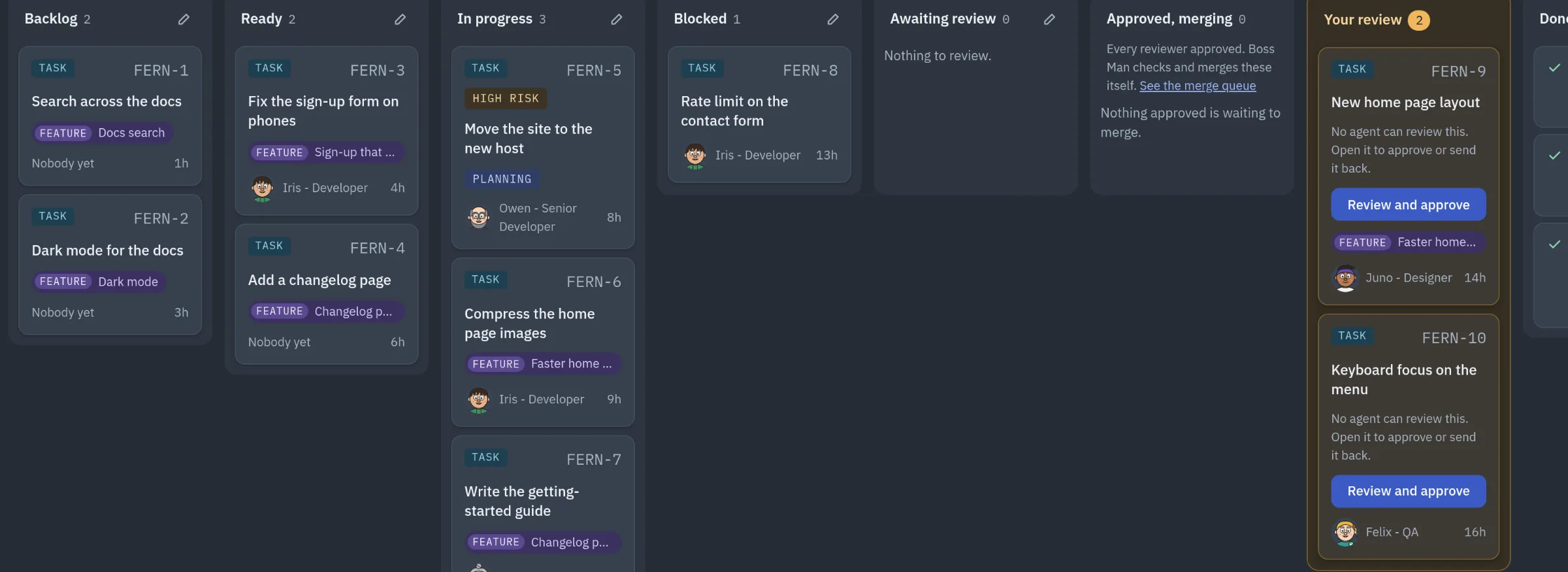
You can rename a column with its pencil. Agents still see the fixed state, shown under the name as "Agents see:".
What Blocked means
Blocked holds every ticket that is only waiting. A ticket can be Blocked when:
- it waits on another ticket
- a card on Decisions is open for it, including a plan card
- it waits until a set date and time
- it is merged and its after-merge checks wait for the change to go live
A plan card moves its ticket to Blocked by itself. When the plan is answered, the ticket is free to carry on. A merged ticket that waits to go live also moves to Blocked, and goes back to In progress when it is live and the checks can be made.
An agent cannot move a ticket to Blocked unless one of these is true. Blocked tickets never count towards the in-progress limits.
In-progress limits
An in-progress limit stops agents starting more work than they can finish. There are two, under Settings > Server and runner, in Tickets in progress:
- Tickets in progress per agent: 2 by default, one being worked and one waiting on its check
- Tickets in progress, whole company: off by default
Leave a box empty for no limit.
When an agent is at its limit, a new ticket for it waits in Ready. Its note says, for example, "Waiting: Soo is at the limit of 2 in-progress tickets; starts when one finishes." It starts by itself when one of that agent's tickets moves to Review, Done or Blocked.
The limit never holds work that was already started, such as a ticket sent back with changes requested. An urgent ticket may start even when the agent is at its limit.
Some tickets in In progress cannot move, so they do not count. Each one shows the reason on the board:
- Not counted: waits on a ticket, with that ticket's reference
- Not counted: plan with owner, when its plan waits for approval
- Not counted: merged, waiting to go live
The three review lanes
The Review column splits into three lanes:
- Awaiting review: an agent has finished and asked for review
- Approved, merging: every reviewer approved, and Boss Man is checking and merging it
- Your review: tickets from any column that are waiting on you
A card in Your review has a button: Review and approve for a sign-off, or Answer in Decisions for a question. Answer in Decisions opens Decisions at that exact card, highlighted. If the card was answered or withdrawn in the meantime, Decisions says "That card is not open any more" instead.
A strip at the top of the board says how many tickets wait on you.
The ticket page
Open a ticket to see its description, Done when lines with each pass or fail, the conversation, the review and the activity.
If the ticket waits on cards from you, they are listed at the top under "Waiting on your decision", each with an Answer in Decisions button.
On the ticket page you can also:
- tick Urgent, which puts it first in the merge queue. An urgent ticket also keeps running when Boss Man pauses routine work because a subscription plan is nearly used up (the quota hold).
- tick Doesn't need code changes for research, wiki or docs work, so it can close with no change to the repository
- write steps under After it goes live, you'll need to, for something you must do once the change is live
Decisions
Open Decisions in the sidebar. The number beside it counts only the cards that need you now. Cards in "Waiting, nothing to do yet" are not in that number: the page heading shows them separately, for example "3 decisions to do · 2 waiting".
Each card shows what kind it is (Plan, Permission, Approval, Question, Stale blocker, Stalled run and others), what is being asked and the options.
Cards are newest first, with these exceptions:
- steps you need to do by hand come first
- an urgent Boss Man update, one that carries the fix for a problem on your live server, also goes to the top
- cards waiting on an agent sit at the bottom under "Waiting, nothing to do yet"
Small labels at the top of a card say why it matters:
- Moss is waiting on you: the agent named is paused until you answer
- Holds up BOS-12: the ticket this card blocks, with +2 more if it blocks others too
- Due 14 Nov: the date the answer is due
A card with none of these labels holds nothing up. The labels do not change the order.
Being re-checked
An amber Being re-checked strip means someone is confirming the card is still needed, for example because the work moved on since it was raised. If it is not needed, the card closes by itself. You can still answer it now.
A red Not re-checked strip means nobody re-checked the card in time. It says who should have.
Answering a card
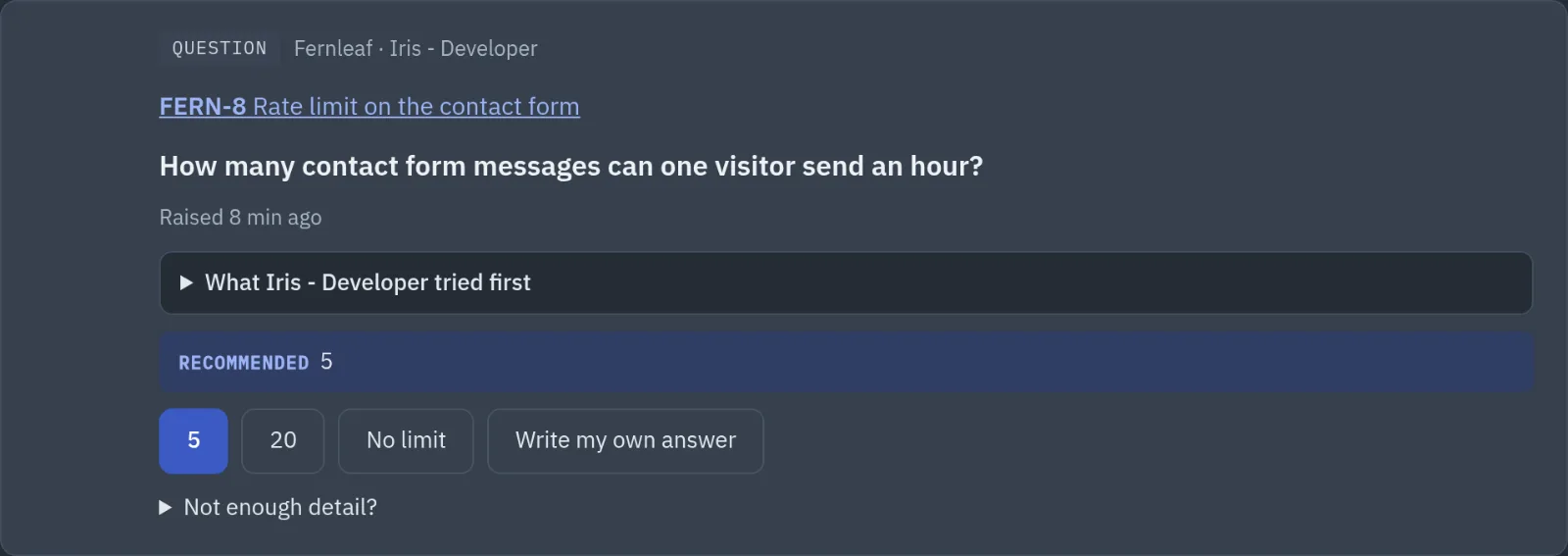
- Read the card. The heading is the question. The text under it says what the agent wants and what it already tried.
- Look under Your answer. The recommended button is marked Recommended. On plan, sign-off, permission and stalled-run cards, a line under each button says what happens if you press it.
- Choose a button.
- Or, on a question card, choose Write my own answer, type it, and choose Send my answer.
- If you need more, choose Not enough detail?, then Ask the CEO for advice.
On a plan or sign-off card, a note box sits under the buttons. What you type there is sent with Keep planning or Send it back.
If you run more than one company, the All companies filter shows cards from every company together.
The sign-off card
For high and critical work, the sign-off card lists what was checked, so you can decide without opening the ticket:
- Reviews: each reviewer and their verdict, such as "✓ Passed" or "✗ Changes asked"
- Quick check: whether the agent's last quick check passed, on which commit and when
- Change: how many files changed, and the risk level
- Built by: the agent who built it, with a link to the ticket
Approve and merge runs the full check and merges the work. If that check fails, the ticket goes back to the agent, not to you. Send it back returns it to the agent with your note, and the reviews start again when it comes back.
Closed cards
Cards closed in the last 30 days are folded at the bottom under Closed in the last 30 days. Each line starts with what happened: Answered, Allowed, Denied, Withdrawn or Replaced.
A plan marked Replaced says who wrote the newer plan and when. Choose Open the newer card to go to it.
Something wrong or missing? Tell us on GitHub.